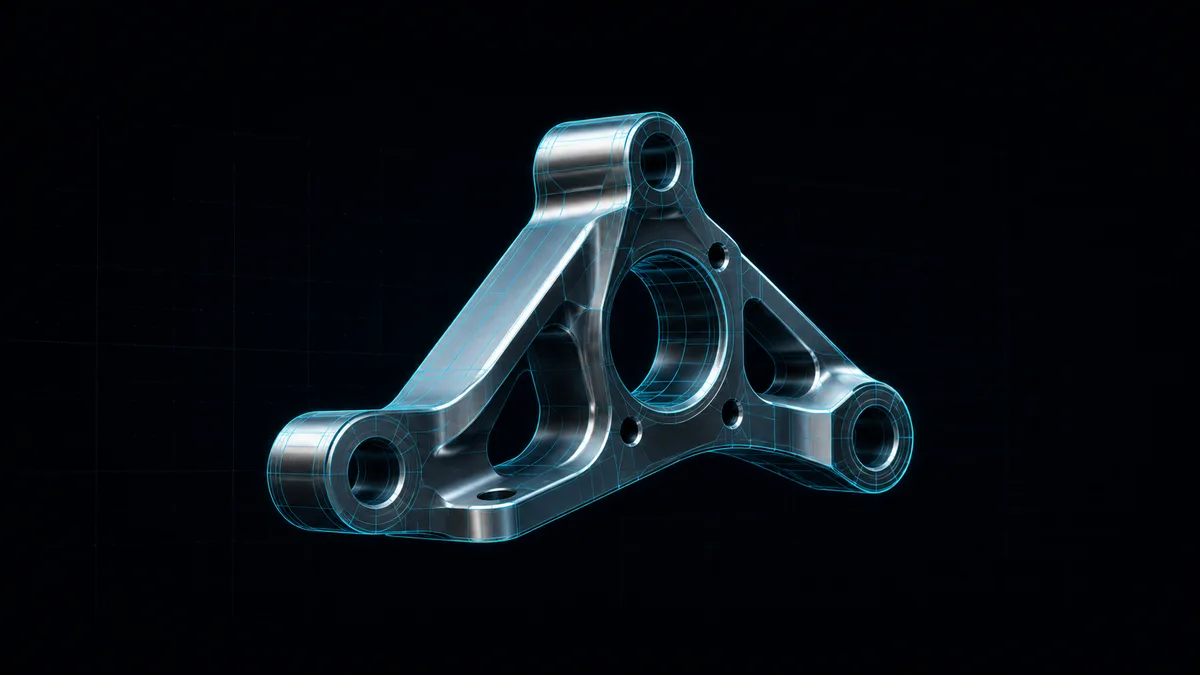
A STEP file is the neutral 3D CAD interchange format that SolidWorks,
Fusion 360, Catia, FreeCAD, and almost every other CAD package exports
when a model has to leave its home application. Unlike an STL — which is
just a shell of triangles — a STEP file carries the exact solid geometry:
the planes, cylinders, fillets, and curved surfaces that define the part,
plus the assembly structure that ties parts together.
That precision is exactly why STEP files are awkward to open. The format
describes geometry mathematically, so reading one properly means running
a CAD kernel — the same class of software that powers a desktop modeller.
Below is what the format actually is, why opening it usually drags in a
license or an upload, and how Loft renders one in a browser tab without
either.
What a STEP file actually contains
STEP is short for Standard for the Exchange of Product model data,
standardised as ISO 10303. The two application protocols you meet in the
wild are AP203 and AP214; a newer one, AP242, folds both together and
adds product manufacturing information. The file itself is plain text —
open one in a text editor and you’ll see thousands of numbered lines
referencing each other.
The geometry inside is a boundary representation, or B-rep: the model
is described as a set of trimmed surfaces stitched into a watertight
solid, not as a pile of triangles. That’s the whole reason CAD teams
trade STEP instead of STL — the surfaces stay exact, so the receiving
engineer can measure, section, or re-machine from them.
Who needs to open one — and the pain
The person opening a STEP file is rarely the person who modelled it.
A buyer checking a supplier’s part. A machinist confirming a pocket
depth before quoting. A board designer dropped a mechanical enclosure to
fit a PCB into. A lawyer or auditor handed a .step as evidence with no
idea what to do with it.
For all of them the usual options are bad. Install SolidWorks or Catia —
a paid seat, a heavy install, and overkill for a thirty-second look.
Install FreeCAD or eDrawings — free, but still a desktop download you may
not be allowed to put on a work laptop. Or paste the file into an “online
STEP viewer,” which almost always uploads it to a server-side kernel
first. When the part is unreleased product IP, that upload is a
non-starter.
How Loft opens it in the tab
Loft’s STEP Viewer runs a real CAD
kernel inside the browser. The engine is a B-rep tessellation kernel
written in Rust — derived from Formlabs’ Foxtrot project, used under its
Apache/MIT licence — and compiled to WebAssembly. Your browser loads
the kernel once, then parses each .step or .stp file locally and
tessellates its surfaces into triangles. Those triangles go straight to a
Three.js renderer for orbit, pan, and zoom.
This is the part that’s genuinely hard to fake. Most browser “viewers”
that claim STEP support are quietly shipping the bytes to an
OpenCascade or Parasolid kernel on a server. Compiling a B-rep kernel
to run client-side is rare — and it’s what lets the file stay on your
machine. Once it’s parsed, you can switch between shaded, wireframe, and
shaded-with-edges, click two surface points to read a distance in
millimetres, and export the current view as a PNG.
It also reads structure, not just shape. Click any part and the side
panel shows its volume, surface area, bounding box, and colour; the
assembly tree highlights the same part, and an eye icon hides it so you
can look inside a busy assembly without exporting a section view.
What surfaces and versions it handles
The kernel covers the surface types most mechanical parts are built
from: planes, cylinders, cones, spheres, tori, and B-spline surfaces,
across the 26 STEP entity types that carry the bulk of everyday part
geometry. AP203 and AP214 are the strongest paths today, and many AP242
files parse too, since AP242 is a superset of AP214.
If you’d rather see the difference between exact CAD surfaces and a
triangle mesh, the STL viewer sits right
next door and opens the mesh formats — STL, OBJ, PLY, GLB, 3MF — through
one shared WebGL viewer. STEP is the one format that needs the heavier
kernel; the mesh formats don’t.
The privacy angle is a side effect of the engineering
The reason the file never leaves your tab isn’t a policy promise — it’s
where the code lives. Because the kernel that can read the geometry is
already running in your browser, there’s no upload step to opt out of.
Nothing transits a server, so a confidential part can be opened on a
shared, hotel, or client machine without leaving a copy behind.
That matters more for CAD than for almost any other file type. A STEP
file is the product. If you want the longer version of how this
works across Loft’s tools, the pillar at
/docs/how-it-works/ walks through the
no-server pipeline; the
CAD-viewer-on-a-phone case study
covers the same constraints from the PCB side.
Honest limits
A few things to set expectations, because I’d rather you find them here
than in the tab:
- It’s read-only. The viewer won’t let you edit the model, move a
feature, or re-export geometry. It’s for inspecting and measuring, not
modelling. A browser tab is the wrong place to rebuild a part anyway.
- Some surfaces aren’t covered yet. Spun, offset, and swept surfaces
fall outside the current entity set. When a file leans on them, the
viewer shows a clear error rather than rendering a half-broken solid —
entity coverage widens over time.
- It’s STEP and STP only. IGES and DWG aren’t browser-native formats;
convert them upstream to STEP first. DXF (2D) has its own
DXF viewer, and ODB++ is a roadmap
item.
One more, on the security side: the parser runs on bounded inputs and is
panic-safe, so a malformed or deliberately hostile file fails cleanly
instead of taking the tab down. I learned to care about that the hard way
— a single corrupt B-spline in an early test file used to spin forever.
Because it’s all browser code, the viewer runs wherever a modern browser
does — Windows, macOS, Linux, ChromeOS, and tablets. There’s no platform
build to maintain and no app-store gate, which is the whole point: the
same tab that fails to open a STEP file today is the one that opens it the
moment you load the page. The technique here, if you want to go read about
it, is tessellation — turning exact surfaces into render-ready
triangles — and it’s the bridge between a CAD kernel and a GPU.
Takeaway
A STEP file holds exact solid geometry, which is why opening one normally
means a CAD license or a server upload. Loft’s STEP Viewer skips both: a
Rust-to-WebAssembly B-rep kernel parses and tessellates the file in your
browser, you orbit and measure and screenshot, and the part never leaves
your device. When someone drops a .step on you and you just need to
look, open it at
/tools/open-tools/step-viewer/.