Case study May 25, 2026 · 5 min read
Building a CAD viewer that runs on a phone — Gerber case study
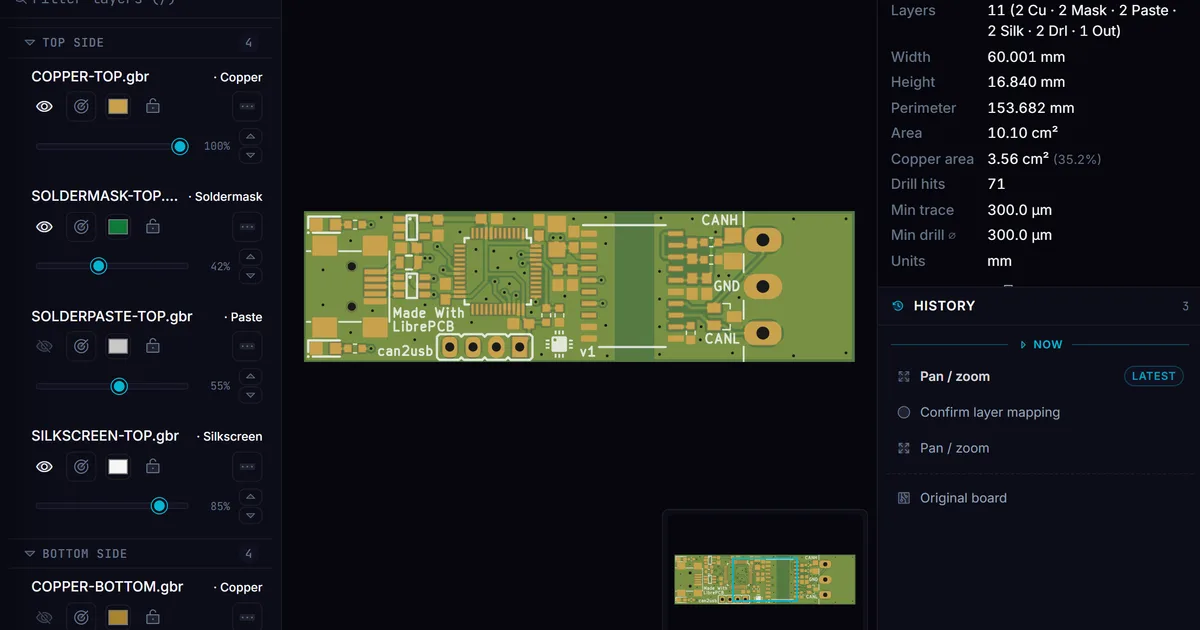
Gerber files are the industry standard for printed-circuit-board manufacturing. Reading one normally requires a desktop CAD package. Loft has a Gerber viewer that runs in any phone browser. Here is how, what it took, and what the limits are.
By Khine 1,034 words → Gerber Viewer Extractable lead
A board designer emailed me one Friday afternoon. I’m in a
fabrication review on an iPad, my vendor just sent me a Gerber
bundle, and there’s no Gerber viewer for iPad that I trust with
the file. Is your tool ready?
It wasn’t. Six weeks later it was. This post is the postmortem
on how a Gerber viewer ended up working in any phone browser
in 2026.
The problem the email landed in
Gerber X2 is the standard manufacturing format for printed-
circuit boards. A complete board ships as a bundle: one Gerber
file per copper layer, an Excellon drill file, layer-pair
metadata, an aperture macro definition. Reading the bundle
normally requires a desktop CAD package — Altium Viewer,
CAM350, GC-Prevue, KiCad. Each of those is Windows-first; the
Mac and iPad options are thin or unmaintained.
The designer who emailed me was on iPad because they’d just
walked away from their desk and needed to look at the file
now. The vendor was expecting a response in the next hour.
The IP in the file — copper traces, pad positions, drill
metadata — encoded their product, and they refused to upload
it to a “free online Gerber viewer” they hadn’t vetted.
The combination of constraints — Mac/iPad device, time
pressure, can’t upload — is the gap that Bluebeam Revu used to
fill until they killed the iPad app in late 2025. Nothing
replaced it.
What we built
A Gerber viewer running entirely in the browser tab, no upload.
Tested on iPad Safari, iPhone Safari, Android Chrome, every
desktop browser. Total bundle weight for the viewer (worker +
renderer + UI) is around 800 KB compressed. Smaller than most
native CAD viewers’ splash screens.
Key pieces:
- A parser worker that handles Gerber X2 and Excellon drill files
- Canvas2D and WebGL renderers with shared geometry
- A measure / inspect layer mapping pixel coordinates to board
coordinates
- A snapshot serialiser that encodes view state into a shareable
URL
What was harder than expected
Aperture macros. The Gerber spec lets a board designer
define custom aperture shapes via parameterised macros. The
spec is small but expressive — circles, rectangles, ovals,
custom polygons, with rotation, scaling, hole-cutouts. Most
boards use a handful of common macros. Some boards use thirty
nested macros. The parser has to handle both.
Tessellation at small zoom levels. A modern 8-layer board
with millions of geometry primitives takes hundreds of MB to
expand fully into canvas-ready geometry. Loft’s own decompression
cap doesn’t fit it on constrained devices. We solved this by lazy expansion (don’t
parse layers until they’re shown) and tessellation
simplification (skip features smaller than a pixel at the
current zoom level). Both add complexity but bring large boards
into range.
Touch input precision. Snap-to-pad measurement is finicky
with finger taps. The first version was unusable on phone — you’d
tap near a pad and the snap target was something else nearby.
We added a tap-target halo (~16 px) and a magnifier popup on
long-press. After that, measurement on phone became genuinely
usable.
Renderer fallback. WebGL is faster but not every phone has
reliable WebGL2 support. We ship both a Canvas2D and a WebGL
path and pick based on capability detection at runtime. Most
modern phones get the WebGL path; older or memory-constrained
devices fall back to Canvas2D with simplified rendering.
What we didn’t ship
Three things we considered and deferred:
Edit mode. This is read-only. No “draw a new trace.” A
fully editable Gerber viewer is years of focused PCB-CAD work
and a different product than the read-and-measure use case.
3D rendering. Some users want a 3D rendering of the board
with components. Out of scope for now; the Gerber bundle alone
doesn’t have enough information for full 3D (you’d need a
board outline file plus component placement plus 3D models).
ODB++ and IPC-2581. Two newer manufacturing-bundle formats.
Most boards still ship as Gerber X2 in 2026, but the newer
formats are growing. We detect IPC-2581 and surface a clear error rather than
silently failing; a full viewer for it would be a future cycle.
What we learned
Mature open-source libraries got us most of the way. We
didn’t write a Gerber parser from scratch — we built on
tracespace v4 as the parse foundation and reimplemented the tight loops
in TypeScript for Worker compatibility. The spec is open; the
existing tooling is published. The value-add was the renderer
- measure layer + mobile UX, not the parser.
Touch UX is more than half the work for any mobile CAD tool.
Desktop CAD assumes a precise pointer. Mobile CAD has to assume
a finger. The tap-halo and long-press magnifier — two small
features — were what made the viewer usable in the field.
Snapshot URLs were the killer feature for the original use
case. The designer who emailed me ended up sending a Loft
snapshot URL to the vendor as a response. The vendor opened
the same view on their machine, saw the same measurements,
and signed off. The whole exchange happened in under thirty
minutes without anyone uploading the bundle. The URL serialiser
turned out to be a small feature with outsized leverage — the
whole exchange proved that in the first use.
What’s still hard
Very large boards on phone. Multi-layer boards above
roughly 8 layers with high primitive counts may hit memory
limits on iPhone. We surface a warning when we detect a large
file ahead of rendering. Desktop handles them comfortably; the
phone gap is real.
X2 netlist tracing. We render geometry; we don’t trace
connectivity through the netlist information that X2 carries.
Some advanced workflows want this. On the to-do list.
Multi-board panels. Boards shipped in panels (multiple
copies of a single design tiled on the manufacturing sheet)
sometimes have non-standard origin offsets. We handle the
common cases; weird cases get rendered with the wrong board
extents.
The Gerber Viewer is at
/tools/open-tools/gerber-viewer/.
The Ucamco specification is at
ucamco.com/en/gerber/gerber-format-specification.
The designer emailed back two weeks after the original
exchange. The board passed first-article inspection. He sent
a picture of the finished panel. I’m pretty sure that was the
moment Loft stopped being a hobby project for me.