Side-by-side or overlay PDF diff with a document-type selector — Document (contracts, reports), AEC / Blueprint (drawings, schematics), or Image-Scan. Highlights pixel-level differences plus a word-level text diff in a modal.
A service worker is a script the browser keeps running in the background, separate from the page. It is the piece that lets a web page work without the network. Here is how it works, how Loft uses it, and what its limits are.
By Khine890 wordsExtractable lead
§1 — Problem statement
For a web page to work without the network, two things have to
be true. First, the code that runs the page must already be on
the user’s device (or able to be served from there). Second,
when the page tries to fetch something during use, the browser
needs a way to answer the request without going to the network.
Service Workers solve both. They’re a browser-level intercept
layer that sits between the page and the network, caches
responses, and serves cached responses without network round-
trips.
§2 — Definition
A Service Worker is a JavaScript file the browser keeps running
in the background, scoped to a particular website. It intercepts
network requests the page makes, decides whether to answer from
cache or pass through to the network, and can install itself to
serve future requests offline.
The worker runs independently of the page that registered it.
Close the tab; the worker keeps existing. Reopen the page later;
the same worker is still installed and ready.
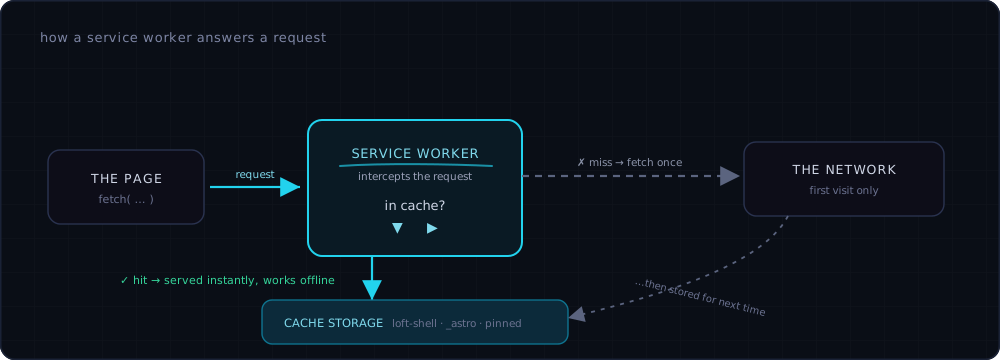
The whole trick in one picture: the worker sits between the page and the network. A cached response returns instantly and needs no connection at all — only a cache miss touches the network, and even then the result is stored so the next request is offline-ready too.
When we ship a new build, Workbox’s precaching mechanism notices
the new file fingerprints and installs them alongside the
existing cache. On next reload, the worker activates the new
version, swaps the cache, and serves fresh code. The swap is
silent.
§4 — Verification
DevTools → Application → Service Workers. Loft’s sw.js should
appear as activated and is running with scope
https://lofttools.com/. Under Cache Storage in the same
Application tab, the cache namespaces show up by name.
Each can be expanded to view cached URLs.
To force a refresh: Application → Service Workers → Update on
reload checkbox → reload. Forces the next activation cycle
without waiting for the natural one.
§5 — Why most sites skip this
Service Workers have existed since around 2016 and every modern
browser supports them. Adoption beyond PWA-style apps has been
slow because:
The mental model is unfamiliar to developers used to “page
loads, page makes request, page gets response.” A worker
between the page and the network is a different shape.
Buggy workers cause real problems — serving stale code,
failing to update, locking users out of new versions. The
cost of a bad service worker is higher than a bad webpage.
Most websites don’t have a reason to work offline. Marketing
sites, news sites, e-commerce — no offline use case.
Local-first tool sites are the natural home for service workers
because offline is a real feature. Loft’s worker is the piece
that lets the architecture deliver on its premise: not just
“code runs locally” but “code runs locally, even when the
network is gone.”
§6 — Constraints
Constraint
Detail
First visit
requires network. The worker only caches what it’s seen.
Cache quota
a few hundred MB to a few GB depending on free disk space.
iOS eviction
Safari evicts caches faster than Chrome, particularly after long idle periods.
Background runtime
browsers may shut workers down when idle; they wake on request.
HTTPS requirement
service workers require HTTPS in production. Localhost is the dev exception.
§7 — Open questions
Eviction policy fairness. When the browser hits the quota,
it evicts caches that aren’t marked persistent. The “marked
persistent” mechanism is partial across browsers. Tracking
the StorageManager.persist() API maturity.
Module workers and ESM imports. Modern Workbox stack
supports them; legacy patterns still use importScripts.
Migration is gradual.
The offline capability depends on what the worker has seen — first
visit always requires the network, and Safari’s more aggressive
eviction policy means returning to a rarely-used tool on iOS can
mean a cache miss. Both are fundamental constraints of the
Cache Storage model, not Loft-specific bugs.