Side-by-side or overlay PDF diff with a document-type selector — Document (contracts, reports), AEC / Blueprint (drawings, schematics), or Image-Scan. Highlights pixel-level differences plus a word-level text diff in a modal.
A Progressive Web App is a web app that can be installed to the home screen, run offline, and feel like a native app. Sometimes that is enough. Sometimes a real native app is the right call. Here is the honest decision tree.
By Khine1,023 wordsExtractable lead
Verdict
Short, bounded tasks (file processing, calculators, viewers,
dev utilities) → PWA is enough, and often better. Install via
URL, update silently, no app-store gate.
Long-running background work, deep OS integration, hardware,
heavy memory, or app-store distribution requirement → native app.
The browser can’t reach these.
Most “is it really an app?” tools — note-takers, calendars,
calculators, tool sites like Loft — sit firmly in the PWA-is-enough
category. The user experience is roughly indistinguishable from
a native app for the user.
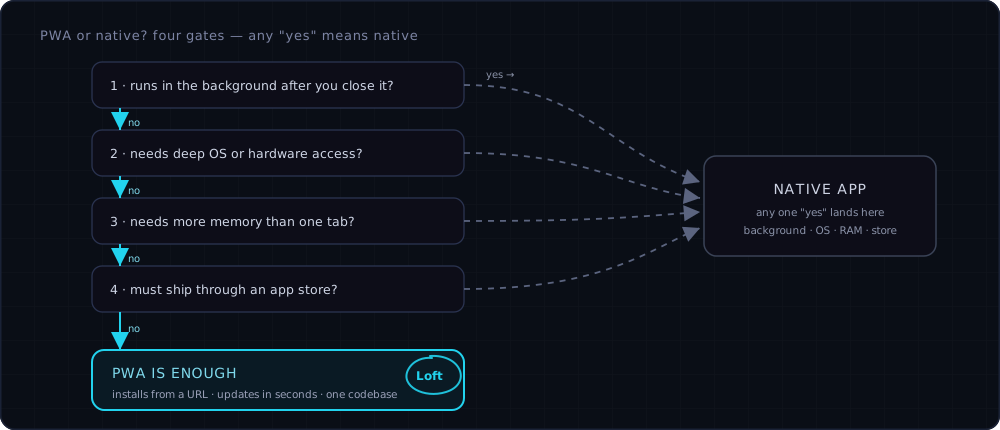
The honest version in one picture: four gates, and any single "yes" points you at a native app. Clear all four — short bounded task, no background work, no special OS hooks, fits in a tab, no app-store requirement — and a PWA is genuinely enough. Loft's file tools land in the all-no corner.
Side-by-side capability table
Capability
PWA
Native app
Installable to home screen
yes
yes
Runs offline
yes (service worker)
yes
Updates automatically
yes (silent on reload)
usually requires user action / app store
Cross-platform from one codebase
yes
usually no (one platform per build)
Available outside app store
yes
usually no
Memory headroom
bounded by tab (per-tab memory cap — typically low hundreds of MB on modern iPhones)
App-store distribution is the business. If your customers
find you in the app store and pay through it, PWA isn’t a path.
Which should I pick when
I’m building a PDF tool / image tool / calculator / converter —
PWA. Short bounded tasks. Loft is in this bucket.
I’m building a fitness tracker that runs in the background —
native. PWA can’t keep recording when you switch apps.
I’m building a note-taking app — either, depending on whether
sync and rich notifications are core. Notion’s PWA is good
enough for most users; Apple Notes’ native integration is worth
the platform lock-in for users who want it.
I’m building a video editor — native. The memory budget alone
rules out PWA.
I’m building a developer utility (linter, formatter, validator) —
PWA. Run once, copy result, leave.
I’m building something that needs to be in the App Store for
distribution reasons (school IT requires it, employer-managed
device) — native. The PWA install path doesn’t satisfy the IT
policy even if it’s technically capable.
Loft’s choice and its costs
Loft is PWA, not native. The reasoning:
Our workloads are short, bounded, file-based.
One codebase, not three (web + iOS + Android).
Updates ship in minutes, not days.
We avoid app-store gatekeeping and platform fees.
Browser-side architecture is the moat; native would only add
surface, not capability.
The honest tradeoffs we accept:
iOS PWA install discoverability is poor. Most users never
realise they can install a website. We do what we can with an
install prompt; the gap is on browser vendors, not us.
iOS Safari evicts caches aggressively. A PWA you haven’t
opened in a while may need to re-fetch its shell.
Heavy workloads hit the tab memory cap. A 500-page scanned
PDF can struggle on iPhone where Acrobat wouldn’t.
For occasional file work — what Loft actually gets used for — the
tradeoff is fine. For a user who runs into the limit every day,
a native app from a different vendor may genuinely be the better
fit.
A subtlety I keep getting wrong
I sometimes describe PWAs as “just a website with an icon.” That’s
not wrong, but it undersells the service-worker piece. A normal
website without a service worker isn’t installable, doesn’t work
offline, and doesn’t behave like an app. The service-worker layer
is what does the heavy lifting. The icon is the user-visible part;
the worker is the engine. Worth correcting the next time I write
this kind of post.