Side-by-side or overlay PDF diff with a document-type selector — Document (contracts, reports), AEC / Blueprint (drawings, schematics), or Image-Scan. Highlights pixel-level differences plus a word-level text diff in a modal.
Why we use PDF.js + pdf-lib instead of a server pipeline
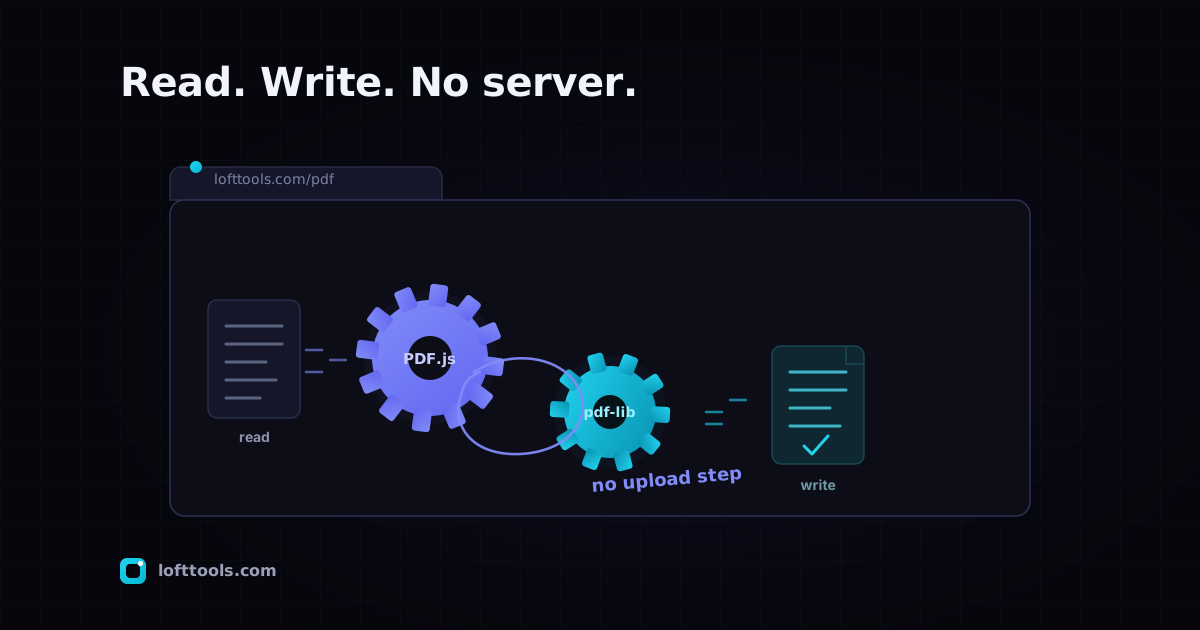
PDF.js handles reading and rendering. pdf-lib handles creating and editing. Together they replace what most online PDF tools do on a server. Here is the engineering reason we went with them, and what each one is good for.
By Khine1,127 words→ PDF EditorExtractable lead
The first PDF tool I built for Loft was an autodidact’s parser
written from scratch in TypeScript. I wanted to understand the
format. I spent eight days walking through the PDF specification,
implementing object-stream decoding, building a cross-reference
table parser, getting tripped up by linearised PDFs and inline
images and DCT-encoded JPEG streams. At the end of the eight
days I had a parser that read about 60% of the PDFs I threw at
it and rendered none of them.
Then I found PDF.js, and pdf-lib, and the entire question
collapsed into the right answer.
This is the postmortem on that decision.
The problem we needed to solve
A browser-side PDF tool needs to do two things well: read PDFs
(parse them, render their pages, extract text from them) and
write PDFs (assemble new pages, modify existing pages, embed
fonts and images). Either capability alone is non-trivial; doing
both well from scratch is a multi-year engineering investment.
For most tools we wanted to ship — compress, merge, split,
rotate, crop, OCR, redact, watermark, sign — the read and the
write capabilities both have to hold up against the messy
reality of PDFs generated by every conceivable tool over thirty
years. PDFs with encrypted streams. PDFs with broken cross-ref
tables. PDFs with XFA forms. PDFs from 1996 that pre-date the
features the spec assumes.
Two paths forward. Build the parser-writer ourselves, learning
the spec at the cost of years. Or stand on the shoulders of the
two open-source projects that have done this for us.
What we picked, and why
PDF.js (Mozilla’s renderer, the same engine Firefox uses for its
built-in PDF viewer) for the read path. Production version in
the Loft bundle: 5.6.205. Handles parsing, rendering, text
extraction with positional metadata, structure walking.
pdf-lib (community library, JS-native) for the write path.
Production version: 1.17.1. Handles new-PDF creation, page
manipulation, form-field operations, signature embedding.
PDFium via WebAssembly (Google’s PDF engine, the same one
Chrome uses) for the editor’s true content-stream rewrite path
and heavier rendering jobs.
Three libraries, each strongest at the slice it serves. They
compose cleanly because the PDF format is open and reading is a
different shape of work from writing.
What a server pipeline would have cost
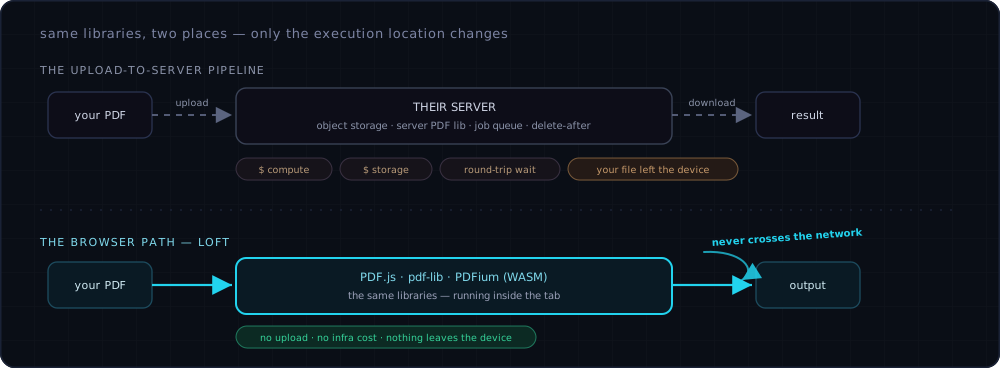
If we’d kept the work server-side, we’d have built (approximately):
A Node or Python service receiving uploaded files. A PDF library
running on the server — pdf-lib in Node land, PyPDF2 or similar
in Python. Object storage for files in flight (S3 / R2 / GCS).
The processing job itself. The result-back-to-user delivery. A
delete-after-N-minutes policy. Monitoring, error handling, a
queue for backlog, a rate limiter to stop abuse.
Each item costs money. Storage scales with traffic. Compute
scales with traffic. A bug or breach in any step has user-facing
privacy consequences. And the user-perceived latency goes up
because of the upload-then-download round trip.
The same libraries, run in the user’s browser instead, eliminate
all of that. PDF.js and pdf-lib were designed to support this —
they work the same in Node and in the browser. Compiled WASM
binaries for PDFium run the same instructions in either
environment. Only the execution location changes.
The same three libraries run in Node on a server or in your browser tab — identical code. The upload lane adds storage, compute, a round-trip wait, and your file leaving the device; running the libraries in the tab deletes that whole top lane.
What the move costs us
Three real costs we accepted:
Memory ceiling. The browser caps tab memory more
aggressively than a server caps process memory. Very large
PDFs can hit the limit. We handle this via paginated processing
where possible and surface a warning where not.
First-visit weight. PDF.js plus pdf-lib plus PDFium WASM
add a few megabytes to first-visit download. Cached after.
No “premium tier” features that genuinely need server
compute. Some operations — massive batch processing, full
XFA-form filling, very heavy OCR on hundreds of pages — work
better at server scale. Our scope deliberately excludes those.
We considered shipping a paid tier with server-side fallback
for the heavy operations. Decided against it: the whole point
of the architecture is that file content never leaves the
device. Adding a server fallback would break the architecture
for the cases that matter most to users who chose us
specifically for that property.
Where we’re behind Acrobat
The honest catalogue of gaps:
Advanced XFA form handling — old-style XFA forms common in
government and enterprise are partially supported in PDF.js,
limited in pdf-lib. Some specific certificate-authority
signature flows that depend on Windows / Mac trust stores. PDF/A
archival profile validation — we produce reasonably-conforming
output but don’t validate as strictly as archival-grade
software.
For routine PDF operations — read, edit, compress, merge,
split, sign with a self-managed signature, OCR, redact — the
stack is solid. Adobe ships everything; we ship the common
path.
What I’d do differently if I started over
Use the libraries on day one. The eight days of writing my own
parser were educational but not load-bearing — none of that code
survived once PDF.js was integrated. The lesson, in retrospect,
is “use mature libraries where mature libraries exist.” Which
is not novel advice, but it’s the advice I’d give younger me.
The one thing I’d keep from the from-scratch attempt: the
exposure to the spec. Even though the libraries do all the
parsing, knowing roughly what a content stream looks like, how
cross-reference tables work, what an object stream is — that
knowledge pays back when debugging weird files. It’s not
strictly necessary, but it’s been useful.
What’s still hard
Three things we’re still figuring out:
PDF/A validation at production grade. We produce close-to-PDF/A
output but don’t enforce all the constraints (no transparent
overlays, embedded fonts, no JavaScript, etc.) at write time.
A user who needs strict PDF/A compliance has to validate
elsewhere.
XFA forms. The format is largely dead but the long tail still
shows up — and PDF.js’s partial support is partial in
ways that are hard to predict per-file.
Performance on big scanned documents. A 500-page scanned PDF
with images is the worst case for browser memory and worker-
to-main-thread message overhead. We handle it; we don’t handle
it as smoothly as Acrobat does.