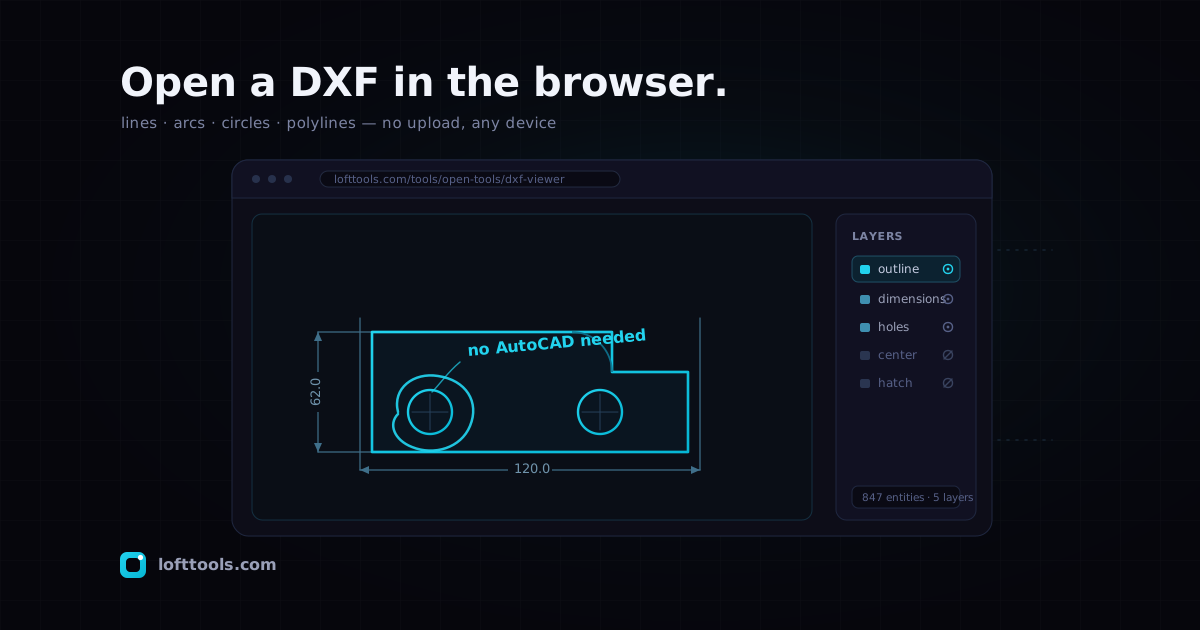
Reference page for the Loft DXF Viewer. Updated when the viewer’s
behaviour changes. Last reviewed 2026-05-27.
What a DXF file is
A DXF file is AutoCAD’s Drawing Interchange Format — a documented,
mostly text-based representation of a 2D (sometimes 3D) CAD drawing.
Where the proprietary DWG format is locked to AutoCAD, DXF was
published by Autodesk specifically so other programs could read and
write the same geometry. A .dxf is a flat list of entities —
lines, arcs, circles, polylines — each tagged with a layer, a colour
and coordinates.
That openness is the whole reason a browser can read one at all. The
geometry is right there in the file, in named groups, with no binary
black box to reverse-engineer. A DWG, by contrast, has no permissive
parser anywhere — so the practical first step for DWG is always
“convert it to DXF first.”
Who needs to open one — and the usual pain
The person opening a DXF is rarely the person who drew it. It’s a
fabricator checking a part outline a client emailed, a contractor
glancing at a site plan, a buyer confirming a vendor sent the right
revision, a project manager who just needs to see the drawing before
forwarding it. None of them own a CAD seat, and none of them should
have to.
The three usual options all have a tax. Install a desktop CAD package
(a download, sometimes a licence, always a Mac/Linux gap). Pay for an
AutoCAD subscription to open a file you’ll never edit. Or drag the
drawing into a “free online DXF viewer” that quietly uploads it to a
server you’ve never heard of — which is a non-starter when the drawing
is a client’s unreleased product.
How Loft’s viewer handles it
Loft’s DXF Viewer parses the file with dxf-parser, a pure-JavaScript
library, and renders the result as inline SVG right in the page.
Nothing compiles, nothing installs, and the file is read on your
device. It draws the most common 2D entities: LINE, CIRCLE, ARC,
LWPOLYLINE, POLYLINE, SPLINE, and ELLIPSE. Splines are
approximated from their fit or control points as connected straight
segments — close enough to read the shape, not a true NURBS curve.
The interaction model is deliberately small. Drag to pan, scroll to
zoom, and hit Fit to frame the whole drawing in the viewport when
you’ve lost it off-screen — fit-to-view is the one control I reach
for most, because a DXF’s origin is often nowhere near the geometry.
A status footer reports what was read: total entity count, layer
count, and a tally of any entity types it skipped. So the viewer tells
you when it left something out, rather than silently showing you a
partial drawing.
Layers, the way CAD people expect
DXF drawings are organised by layer — dimensions on one, the part
outline on another, hidden construction lines on a third. Loft maps
those layers straight into a side panel, and each one toggles on and
off.
That turns out to be the difference between a picture and a drawing
you can actually inspect. Hide the dimension layer to read the
geometry cleanly; isolate one layer to see how busy it really is;
flick layers off one at a time to understand how the file was built —
all without exporting a single variant back in CAD.
The no-upload part (this is the point)
The reason this tool exists is that dxf-parser runs entirely in your
tab. There is no upload step, no server-side render, no “processing…”
spinner phoning home. The bytes of your drawing are handed to a
JavaScript parser in the same browser tab you dropped them into, and
that’s the end of the journey.
For a hobby drawing it doesn’t matter. For a client’s unreleased part,
a defence-adjacent assembly, or anything under NDA, it’s the whole
ballgame — the difference between “I looked at the file” and “I
transmitted the file to a third party.” If you want the longer version
of how an in-browser tool can do real work without a server, the
how it works page walks through the model end
to end.
Honest limits — what it does not do
The viewer is read-only. It will not let you edit the drawing, move
an entity, or save a modified DXF — it shows you what’s there and stops.
The output you can take away is a PNG screenshot of the current
view (pick the resolution and background to match a slide deck), not a
new CAD file.
A few entity types are deliberately skipped in this version, and the
footer names them when it meets them:
| Entity type | Status | Why |
|---|
LINE, CIRCLE, ARC | Rendered | Core 2D primitives |
LWPOLYLINE, POLYLINE | Rendered | Connected segments |
SPLINE | Rendered (approx.) | Straight-segment approximation of fit/control points |
ELLIPSE | Rendered | Full + partial ellipses |
TEXT, MTEXT | Skipped | No font rendering yet |
HATCH | Skipped | No fill-pattern engine yet |
INSERT (block refs) | Skipped | Block geometry not expanded |
3DFACE, MESH | Skipped | 3D entities, rare in 2D DXF |
So if a drawing leans heavily on text callouts, hatched section fills,
or repeated blocks, you’ll see the linework but not those elements —
and the footer will tell you exactly how many it dropped. Those are on
the roadmap, not pretending to be done.
One more boundary worth stating plainly: this is a 2D linework
viewer, not a solid-model viewer. If what you actually have is a 3D
part — a .step, .stl, or .glb — DXF is the wrong tool. For STEP
solids there’s a separate viewer that runs a real Rust-and-WebAssembly
B-rep kernel in the browser; that’s a genuinely different machine,
described in /tools/open-tools/step-viewer/.
DXF comes in two flavours — plain ASCII and a binary variant — and
dxf-parser auto-detects which one it’s looking at, so you don’t have
to know or care. Drop either; it figures it out.
The viewer accepts files up to 50 MB, which covers the overwhelming
majority of 2D drawings comfortably. (Architectural site plans with
tens of thousands of entities are the kind of thing that gets large;
a single machined part rarely troubles the limit.)
DWG — AutoCAD’s native binary format — is not supported, and that’s a
licensing wall rather than an oversight: every open-source DWG library
carries a GPL licence that Loft can’t ship. Convert the DWG to DXF in
AutoCAD, LibreCAD, or QCAD first, then drop the DXF here.
There’s nothing to install, so there’s no operating system to be
compatible with. The same tab works on Windows, macOS, and Linux, and
on a phone or tablet — which is exactly the situation that makes a
desktop CAD package useless. The classic case is a fabrication review
on an iPad where the vendor just emailed a drawing: no AutoCAD for
iPad you’d trust with the file, and no reason to upload it. (Loft’s
Gerber viewer running on a phone is the
same idea applied to PCB manufacturing files — a sibling tool in the
same family.)
The takeaway
If you’ve been handed a .dxf and don’t have AutoCAD, you don’t need
it. A DXF viewer online reads the file’s open geometry, draws the
common 2D entities as SVG, lets you pan, zoom, fit, toggle layers, and
grab a PNG — and it does the whole thing in your browser without the
drawing ever leaving your device. Just know its lane: it’s a read-only
2D viewer that skips text, hatches, and blocks for now, and it won’t
touch DWG.
Drop a file and see for yourself at
/tools/open-tools/dxf-viewer/. If you
spot a drawing that renders wrong — wrong extents, a missing entity the
footer didn’t flag — tell us. I’d genuinely rather hear
about the broken file than not.