Side-by-side or overlay PDF diff with a document-type selector — Document (contracts, reports), AEC / Blueprint (drawings, schematics), or Image-Scan. Highlights pixel-level differences plus a word-level text diff in a modal.
Browser-side CAD viewers vs the upload-to-a-server kind
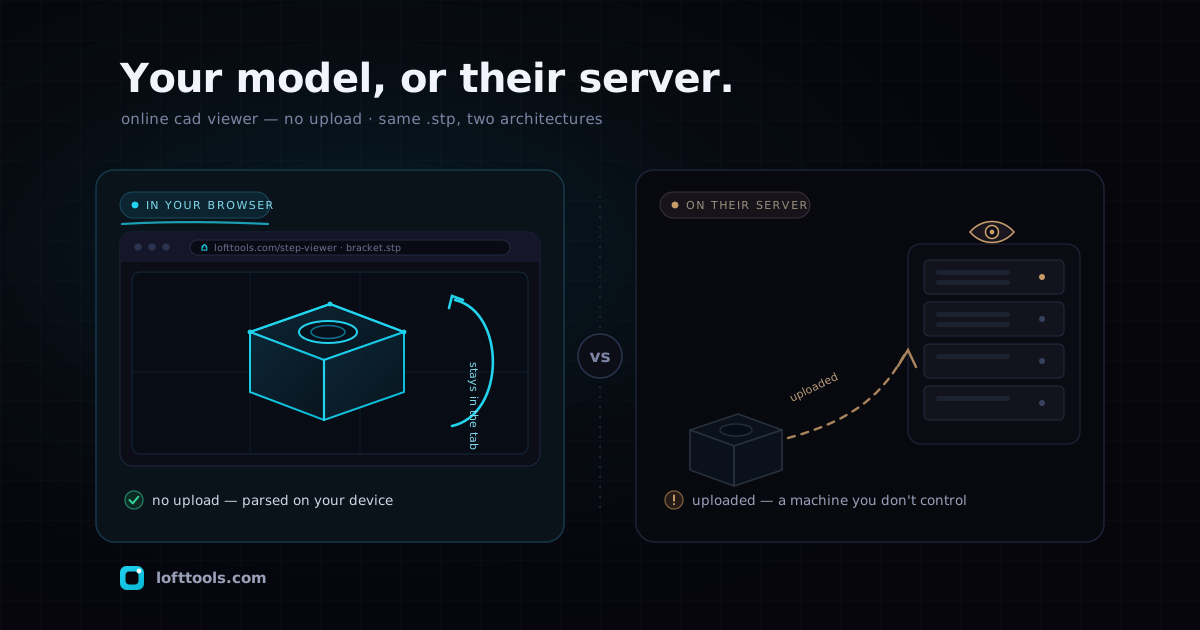
An online CAD viewer that needs no upload parses the file inside your browser tab instead of sending it to a server. A STEP file goes into local memory, a WebAssembly kernel reads it, and the geometry never crosses the network — which matters when the model is your unreleased product.
By Khine1,220 words→ STEP ViewerExtractable lead
A STEP file is the neutral interchange format CAD packages export
to hand a 3D model to someone who doesn’t run the same software. It
carries boundary-representation geometry — exact surfaces, not a
triangle approximation — which is why SolidWorks, Fusion 360,
Catia, and FreeCAD all read and write it. The trouble is opening
one without owning a CAD seat.
What the format actually is
STEP (ISO 10303, files ending .step or .stp) describes a part
or assembly as B-rep solids: planes, cylinders, cones, spheres,
tori, and B-spline surfaces stitched together along trimmed edges.
That precision is the point. A mesh format like STL throws away the
underlying math and ships you a bag of triangles; STEP keeps the
real geometry, so a manufacturer downstream can re-derive
tolerances from it.
The cost of that richness is that STEP is genuinely hard to parse.
You can’t just read vertices and draw them — you have to evaluate
the surface equations and tessellate them into triangles before
anything appears on screen. That parsing step is exactly why “just
open this STEP file” has historically meant “install something.”
Who needs to open one, and the pain
The person staring at a .stp attachment is rarely the person who
authored it. It’s a buyer checking a supplier’s part, a machinist
on the shop floor, a procurement reviewer, a project manager who
got CC’d. None of them own a CAD seat — a SolidWorks license runs
into four figures a year — and they don’t want one. They want to
look at the model, rotate it, maybe measure one dimension, and move
on.
So they reach for a free online CAD viewer. And most of those work
by uploading the file to a server, running a server-side kernel
like OpenCascade or Parasolid, and streaming back a rendered view.
That’s fine for a toy bracket off the internet. It is not fine when
the model is your unreleased product and the upload box belongs
to a site you’ve never vetted.
How Loft’s STEP Viewer handles it
Loft’s STEP Viewer parses the
file in your browser. The engine is a B-rep tessellation kernel
written in Rust, derived from Formlabs’ Foxtrot parser (we vendor it
under its Apache/MIT license — Loft is not affiliated with
Formlabs), compiled to WebAssembly. Your browser loads that kernel
once, then reads the STEP bytes locally and turns the surface
definitions into triangles for a Three.js scene. No server round-trip
happens at any point.
From there it behaves like a viewer should. Drag to orbit,
right-click to pan, scroll to zoom. Toggle between shaded,
wireframe, and shaded-with-edges. Click any part to see its volume,
surface area, and bounding box in the side panel, with the matching
node highlighted in the assembly tree. Hide a part with the eye
toggle to look at internal geometry. Click two surface points and
the distance prints in the status bar, in the file’s native units —
usually millimetres.
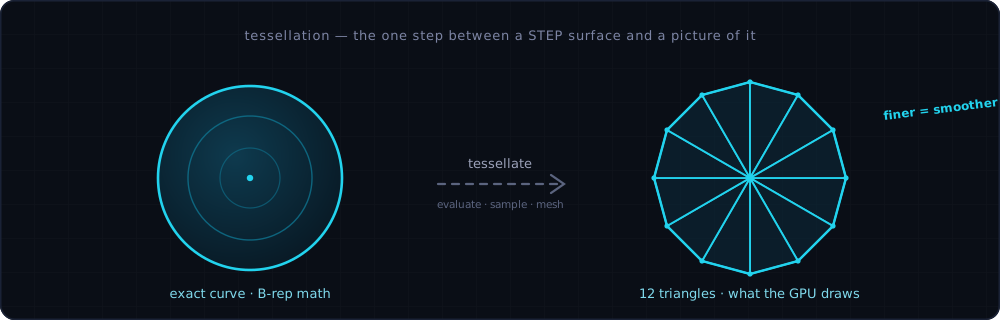
The technique worth knowing the name of is tessellation:
turning continuous B-rep surfaces into a triangle mesh fine enough
to look smooth. Search that word and you’ll understand the one
operation standing between a STEP file and a picture of it.
Tessellation in one picture: the kernel takes a STEP file's exact curved surfaces and approximates them with triangles fine enough to look smooth. Finer meshes look rounder — that conversion is the whole job a B-rep viewer does before anything appears on screen.
When you’re done inspecting, the Screenshot button exports the
current view — part visibility and all — as a PNG you can drop into
an email.
The no-upload part, which is the whole point
This is the difference the headline keyword is reaching for: an
online CAD viewer with no upload isn’t a marketing flourish,
it’s a different architecture. The file goes into the tab’s memory,
the WASM kernel works on it there, and there is no upload endpoint
for it to leave through — because there isn’t one. You can confirm
this the same way you’d confirm it for any tool: open your browser’s
Network tab, load the model, and watch for a file-sized POST that
never comes. The browser enforces the boundary regardless of what
any copy promises.
Browser-side STEP rendering is genuinely rare, and I’ll be honest
about why — it’s hard, and for years it wasn’t possible at all.
Until WebAssembly matured, a browser simply couldn’t run a B-rep
kernel fast enough, so the upload-and-render approach wasn’t a lazy
choice, it was the only one. That era’s gone now. The kernel runs
on your device, which is the same reason this whole genre of tool
ties into the browser-tab-vs-cloud-server
distinction: your IP stays under your hands, not in someone’s
deletion window.
Honest limits
The viewer is read-only. It won’t let you edit the model, move a
feature, or re-export a modified STEP — it shows and measures, it
doesn’t author. If you need to change geometry, that’s still CAD-seat
work; this is the read-and-inspect lane, deliberately.
Coverage has edges, too. The kernel handles the common surface
types that cover most mechanical parts — planes, cylinders, cones,
spheres, tori, B-splines, and 26 entity types in all — with AP203
and AP214 as the strongest paths and many AP242 files parsing since
AP242 is a superset of AP214. Files that lean on spun, offset, or
swept surfaces the kernel doesn’t yet handle will surface a clear
error rather than render half a part. I’d rather the tool admit it
choked than quietly show you the wrong shape. And to be plain about
the family tree: STL, OBJ, PLY, GLB, and 3MF are mesh formats and
share one Three.js WebGL2 viewer that draws their triangles
directly — STEP is the one format here that needs the heavyweight
Rust kernel, because it’s the only one storing real surfaces
instead of pre-baked triangles.
Cross-platform, because the browser is
The reason this approach is worth the engineering is that a
browser-side viewer runs wherever a browser does. The same STEP
Viewer opens on a Mac, a Windows laptop, a Linux box, an iPad in a
supplier meeting, or an Android phone — no install, no license, no
platform-specific build. That’s the same property that lets a
CAD viewer run on a phone at all:
once the kernel is WebAssembly and the renderer is WebGL, the
operating system stops mattering. The machinist on the shop-floor
tablet and the engineer on the workstation see the identical model.
The takeaway
If you only need to look at a STEP file — rotate it, read a
dimension, grab a screenshot — you don’t need a CAD license and you
don’t need to hand the file to a server. A browser-side viewer does
the job locally, on any device, and the model never leaves the tab.
Drop your .step or .stp into the
STEP Viewer and see it for
yourself. If you want the longer version of how the no-upload
architecture works across every Loft tool, that lives in the pillar
at /docs/how-it-works/.