Side-by-side or overlay PDF diff with a document-type selector — Document (contracts, reports), AEC / Blueprint (drawings, schematics), or Image-Scan. Highlights pixel-level differences plus a word-level text diff in a modal.
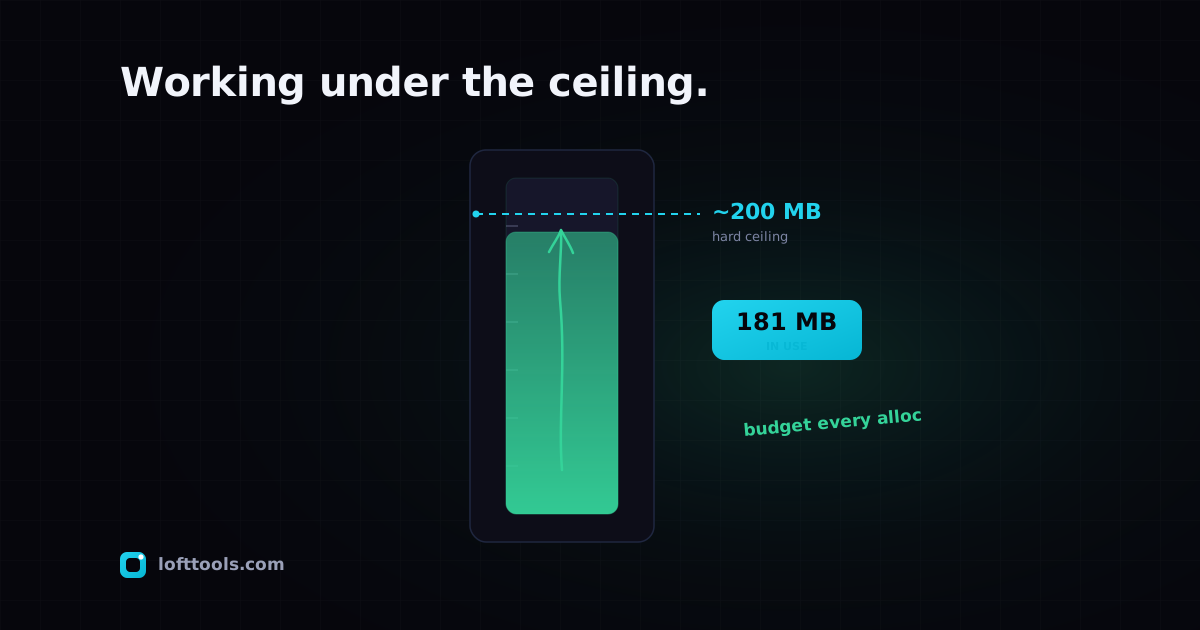
The 200 MB browser memory ceiling and how we work around it
A browser tab cannot use unlimited RAM. On iOS Safari the cap sits around 200 MB. Big PDFs and big videos hit that ceiling fast. Here is how we detect it, work around it, and where we still fall short.
By Khine1,272 wordsExtractable lead
The first time I shipped a PDF compression tool on Loft, I
tested it on a 50-page contract on my desktop and called it
done. A user on iPhone tried it on a 300-page scanned tax
return the next week and the tab silently crashed. They sent us
a screenshot of the “this page is using significant memory”
warning and asked what they should do.
What they should do was easy: switch to a desktop. What we
should do was harder. This post is the postmortem on a year of
fighting iOS Safari’s tab memory cap.
The problem we kept rediscovering
Every browser caps how much memory a single tab can use. On
desktop the cap is generous (multi-gigabyte on modern devices),
and most PDF / image / video workloads fit. On iOS Safari the
cap is around 200 MB per tab. Different workloads hit it
differently:
A 500-page text-only PDF: probably fine.
A 50-page PDF with embedded images at 4K resolution: maybe
not.
A 1-hour 1080p video compression in FFmpeg: definitely not.
An OCR pass across many pages: cumulative state can hit the
ceiling before the document finishes.
A 12-layer Gerber bundle with millions of primitives: hits
the ceiling during tessellation.
The user-visible failure mode is the worst kind of failure:
the tab silently dies. iOS Safari’s process-killer kills the
process, the user sees a “Safari quit unexpectedly” message or
just a blank page, and the work they were doing is gone. No
exception is thrown, no error appears in our logs, no
diagnostic survives.
I learned this by watching it happen on my own phone, twice,
on documents that shouldn’t have been near the limit. The
second time was when I started taking the ceiling seriously.
What we tried
Five techniques landed in the codebase, in roughly the order
we discovered we needed them:
Process one page / one frame at a time. The biggest single
win. Instead of reading a 500-page PDF into memory all at once,
we read page 1, process it, write to output, release, read
page 2, process, write, release. The peak memory needed is one
page’s worth, not the whole document. This works because PDFs
support page-by-page streaming if you go through the right API.
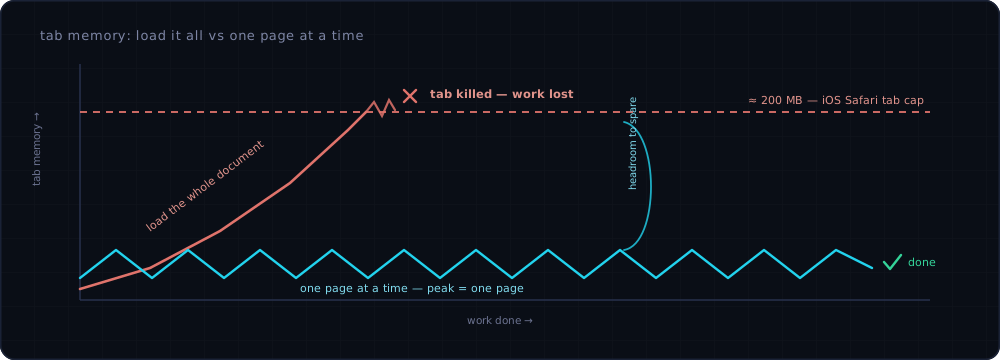
Why per-page processing is the biggest single win. Loading a whole document ramps memory straight past the cap and the tab dies silently, taking the work with it. Read a page, process it, release it, repeat — and peak memory stays at a single page, a low sawtooth that never approaches the ceiling.
Aggressive intermediate tensor release. ONNX Runtime Web’s
neural-network execution generates intermediate tensors that
can be released as soon as the next layer consumes them. We
made sure release happens immediately rather than at GC time.
This dropped peak memory for OCR by roughly half.
Tessellation simplification at small zoom. The Gerber
viewer renders simplified geometry at zoomed-out levels (skip
features smaller than a pixel) and only loads full detail when
the user zooms in. Bounds peak memory per view rather than per
file.
Web Worker isolation. Each heavy tool runs in its own Web
Worker. The main page memory stays small while the worker
handles the file. If a worker hits its own ceiling, the main
page survives — the user gets a clear error rather than a
silent tab crash.
Pre-flight size warnings. When we can detect ahead of time
that a file is likely to exceed the ceiling (because the file
is over a known threshold for the operation), we warn the user
up front. Better to say “this 500 MB video may not fit in your
current browser” than to crash five minutes into processing.
Where we still fail
A negative inventory of cases the techniques above don’t fully
fix:
Very large scanned PDFs on iPhone. A scanned 500-page
document with image-heavy pages can hit the ceiling even with
per-page processing because the rendered intermediate page
itself is large. We can mitigate by downsampling render
resolution, at some quality cost. The user has to know to
trade quality for memory.
High-resolution video encoding on iPhone. FFmpeg needs a
frame buffer for encoding; 4K video is just too much. Loft
caps at 1080p; anything beyond that won’t fit on iOS.
Batch operations on iPhone. Process 50 images one after
another, and even with per-image isolation the WASM heap can
fragment enough that later operations fail. Restart-the-tab is
the only reliable fix; we surface a “you’ve processed N items,
consider reloading” hint after high counts.
For these cases, our advice in the UI is consistent: do the
work on a desktop or iPad with more headroom. We don’t pretend
phone parity exists for the very heavy workloads.
Why we didn’t add server fallback
The obvious “fix” is: detect when the browser would fail, send
the file to a server, process there, return the result. We’ve
deliberately not built this.
The whole point of the
local-first architecture is that file
content never leaves the device. Adding a server fallback
would break the architecture for the cases that matter most.
We’d rather lose those jobs to the user’s desktop than gain
them at the cost of the privacy story.
What I’d build if memory weren’t a constraint
A “fast” mode toggle. The current default is “careful” —
process slowly to fit in memory. A “fast” mode for users on
machines with headroom would skip some of the defensive
allocations and run faster. We haven’t shipped this because
detecting “machine has headroom” reliably is hard, and the
default has to be safe for the worst case.
A streaming OCR pipeline. The current per-page approach is
streaming in spirit but the model inference still loads the
whole model into memory upfront. A truly streaming approach
would page model weights in and out as needed. Conceptually
clean, engineering-expensive, and the libraries we use don’t
support it out of the box.
What’s still hard
The memory ceiling on iOS Safari moves with iOS version and
device generation. The “200 MB” figure is an empirical
estimate from community testing; the exact value depends on
which iPhone, which iOS, and what other apps are running. Our
mitigations are tuned for the conservative case. As Apple
raises the ceiling — and they have, gradually, over the past
three years — some of our defensive code becomes unnecessary.
Cleaning it up retroactively requires testing on a matrix of
devices we don’t always have access to.
WebGPU memory is bounded differently from tab heap memory. As
WebGPU adoption grows, more of the heavy work moves to GPU
memory, which has its own ceiling but is separate from the tab
heap. We’re not fully using this yet; ORT’s WebGPU path covers
inference, but FFmpeg-WASM doesn’t have a WebGPU equivalent.
I shipped at least one defensive mitigation that I later
realised wasn’t needed — an aggressive Image.decode() throttle
on the deskew tool. Removed it eighteen months after shipping
it because it was costing performance for no real benefit. The
ceiling-induced caution is real, but it can also push you to
over-defend, and that has its own cost.